Showing posts with label SQL. Show all posts

Login failed for user ‘sa’. The user is not associated with a trusted SQL Server connection.(Microsoft SQL Server error: 18456):
                        Normally if the  SQL Server is not set to use both SQL Server and Windows Authentication Mode, this error will occurred. To fix this issue you have to change the Authentication Mode of the SQL server from “Windows Authentication Mode (Windows Authentication)” to “Mixed Mode (Windows Authentication and SQL Server Authentication)”.


Solution:
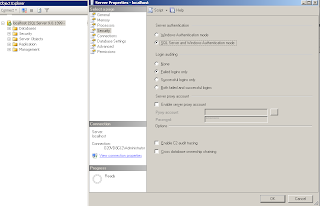
  1.      Go to Start > Programs > Microsoft SQL Server 2005 > SQL Server Management Studio.
  2.      Right-click the Server name. Select Properties > Security.
  3.      Under Server Authentication, select SQL Server and Windows Authentication Mode   (refer the   screenshot below)
  4.     The server must be stopped and re-started before this will take effect.
                                 
            
Read more ...

Getting the Identity of the last Inserted row - ASP.net/C#:

                                    The key to @@Identity is that it returns the value of an autoincrement column that is generated on the same connection.
           The Connection object used for the Insert query must be re-used without closing it and opening it up again. Access doesn't support batch statements, so each must be run separately. It is also therefore possible, though not necessary, to create a new Command object to run the Select @@Identity query. The following code shows this in action where the Connection object is opened, then the first query is executed against cmd using ExecuteNonQuery() to perfom the Insert, followed by changing the CommandText property of cmd to "Select @@Identity" and running that.
Code:

protected void btnSave_Click(object sender, EventArgs e)
    {
        string strConnection = ConfigurationManager.ConnectionStrings["myConnectionString"].ConnectionString;
        SqlConnection sqlConn = default(SqlConnection);
        SqlCommand sqlCmd = default(SqlCommand);
        try
        {
            string query2 = "Select @@Identity";
            sqlConn = new SqlConnection(strConnection);
            sqlCmd = new SqlCommand("INSERT into student (firstname, lastname, street, city, state) VALUES ('" + txtFirstname.Text + "', '" + txtLastname.Text + "', '" + txtStreet.Text + "','" + txtCity.Text + "','" + txtState.Text + "')", sqlConn);
            sqlConn.Open();
            sqlCmd.ExecuteNonQuery();
            sqlCmd.CommandText = query2;
            int idx = Convert.ToInt32(sqlCmd.ExecuteScalar());
            if (idx != 0)
            {
                Response.Write("<script>alert('Successfully saved')</script>");
            }
            else
                Response.Write("<script>alert('Not saved')</script>");
        }
        catch (Exception ex)
        {
            Response.Write(ex.ToString() + "<br>");
        }
        finally
        {
            sqlConn.Close();
        }
    }
Please share this post if it's useful to you. Thanks!.
Read more ...

Remove Duplicate Rows from a Table in SQL Server:
                    Duplication rows in database tables will exists by running the data repeatedly With out  having the primary key on table. Here is an example to remove the duplicate records  from a table in SQL Server


DELETE FROM Employee emp1 WHERE ROW_NUMBER()<>(SELECT MIN( ROW_NUMBER())FROM       EMployee emp2 WHERE emp1.empname= emp2.empname) 

Please share this post if it's useful to you. Thanks!.
Read more ...

Get stored procedure count in sql server

Posted by Prince | 8:29:00 PM | | 0 comments »


Some Important  SQL Queries:

                                     The following SQL queries  are very much used to my one of  a stored procedure based .net project. It may useful you too.


Get stored procedure count from a sql table:

SELECT count(*) SPCOUNT FROM INFORMATION_SCHEMA.ROUTINES
WHERE ROUTINE_TYPE='PROCEDURE'
Get number of function from a sql table:
SELECT count(*) FUNCTIONCOUNT FROM INFORMATION_SCHEMA.ROUTINES
WHERE ROUTINE_TYPE='FUNCTION'
Get all stored procedure name from a sql table:
SELECT name AS spname
FROM sysobjects
WHERE (xtype 'p'AND (name NOT LIKE 'dt%')
ORDER BY name 
Get all table name in a sql database:
Select table_name from information_schema.tables
where table_type='Base table' order by table_name 
Get stored procedure(s) for a sql table:
SELECT DISTINCT so.name
FROM 
syscomments sc
INNER JOIN sysobjects so ON sc.id=so.id
WHERE 
sc.TEXT LIKE '%table name%'
Read more ...

Related Posts Plugin for WordPress, Blogger...